

Centrally create and organize work environments, and arrange configurations and collaboration permissions as needed.
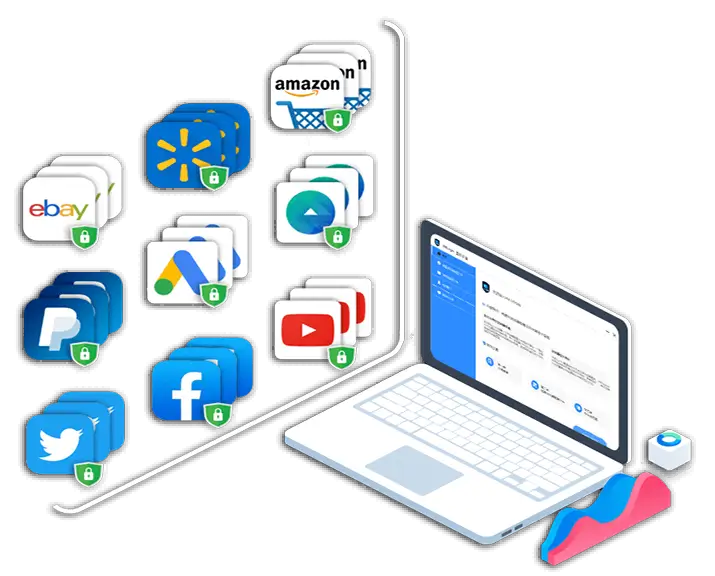
Organize browser work in isolated environments
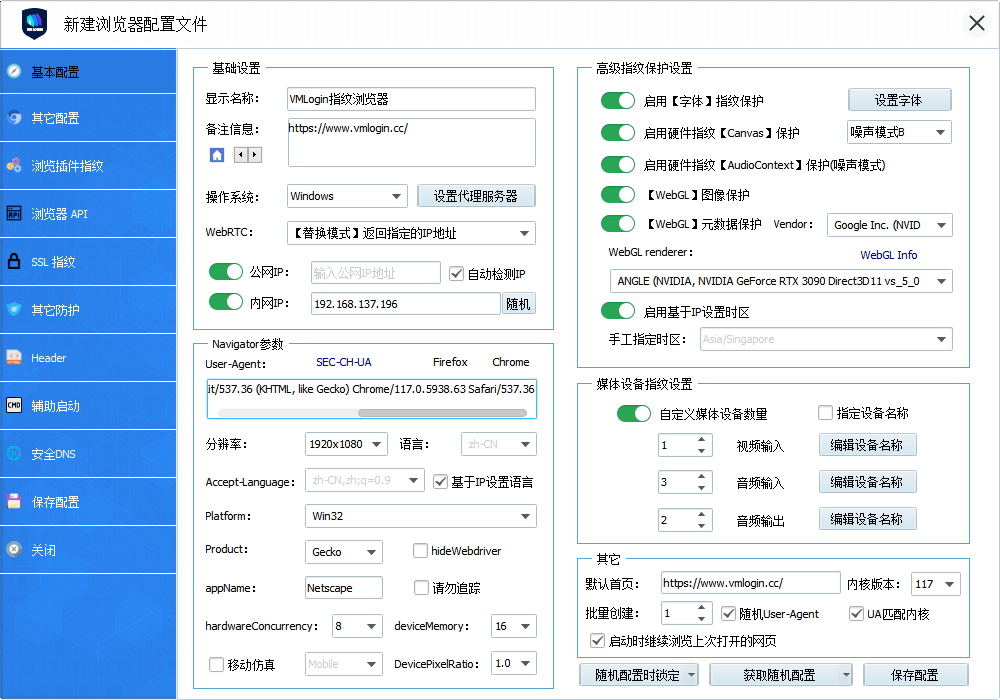
Create multiple independent browser environments on a single computer, and bind a dedicated proxy IP to each profile. Fingerprints, cookies, and caches are isolated from each other, improving account security and operational efficiency. Suitable for multi-platform scenarios such as cross-border e-commerce, social media matrices, and ad campaigns.- Configurable key fingerprint parameters such as Canvas/WebGL/WebRTC/User-Agent
- Multiple accounts run independently as separate identities, suitable for cross-border e-commerce stores and social media matrix operations
- Cloud synchronization and permission management, supporting team collaboration and role division
- Supports custom proxies, compatible with IPv4/IPv6, HTTP(S)/SOCKS5
- Provides Local REST API for automation scripts and batch operations
- Covers platforms such as Amazon, eBay, TikTok, and Facebook, and is also suitable for other websites that support login
A fingerprint browser for multi-platform, multi-account management and anti-association
Centrally create and organize work environments, and arrange configurations and collaboration permissions as needed.
VMLOGINFingerprint BrowserCore Features
Start with isolated environments and organize frequently used projects based on actual work needs.
Multi-account anti-detection management
Combine configuration management with collaborative scheduling to keep daily operations clearly organized.
Precise hardware and software fingerprint simulation
Use work scenarios in a familiar interface and adjust your own settings as needed.
Dedicated proxy IP network environment
View options related to isolated environments and confirm device and version information before getting started.
Secure and efficient team collaboration
Put frequently used functions in easy-to-find locations to reduce repeated searching and switching.
How do websitestrack
me?
Keep useful information around configuration management for convenient continuation next time.
If you need other device versions, you can view configured options in the download center on this page.
VMLogin can create isolated environments on the same computer to prevent fingerprint tracking and multi-account association.
Software download
Multi-account anti-association batch management
Centrally create and organize work environments, and arrange configurations and collaboration permissions as needed.

Virtual browser software and hardware fingerprints
Start with isolated environments and organize frequently used projects based on actual work needs.
See how it works
Combine configuration management with collaborative scheduling to keep daily operations clearly organized.
Put frequently used functions in easy-to-find locations to reduce repeated searching and switching.

VMLoginMulti-account anti-detection browser covers a wide range of application scenarios to support rapid growth
Keep useful information around configuration management for convenient continuation next time.
Digital Marketing & Advertising
If you need other device versions, you can view configured options in the download center on this page.
E-commerce & Cross-border Shopping
Centrally create and organize work environments, and arrange configurations and collaboration permissions as needed.
Social Media Management
Start with isolated environments and organize frequently used projects based on actual work needs.
Cybersecurity & Anti-fraud
Combine configuration management with collaborative scheduling to keep daily operations clearly organized.
Finance & Banking
Use work scenarios in a familiar interface and adjust your own settings as needed.
Online Gaming & Virtual Worlds
View options related to isolated environments and confirm device and version information before getting started.
Data Scraping & Web Crawling
Put frequently used functions in easy-to-find locations to reduce repeated searching and switching.

Market Research & User Behavior Analysis
Keep useful information around configuration management for convenient continuation next time.
Frequently Asked Questions
If you need other device versions, you can view configured options in the download center on this page.
Centrally create and organize work environments, and arrange configurations and collaboration permissions as needed.
Start with isolated environments and organize frequently used projects based on actual work needs.
Combine configuration management with collaborative scheduling to keep daily operations clearly organized.
Download Center
Use work scenarios in a familiar interface and adjust your own settings as needed.
View options related to isolated environments and confirm device and version information before getting started.
Version selection
Put frequently used functions in easy-to-find locations to reduce repeated searching and switching.
Keep useful information around configuration management for convenient continuation next time.
If you need other device versions, you can view configured options in the download center on this page.
Version selection
Centrally create and organize work environments, and arrange configurations and collaboration permissions as needed.
6. How do I claim a trial?
Start with isolated environments and organize frequently used projects based on actual work needs.
Combine configuration management with collaborative scheduling to keep daily operations clearly organized.
2. Are there recommended channels for purchasing proxy IPs?
Use work scenarios in a familiar interface and adjust your own settings as needed.
View options related to isolated environments and confirm device and version information before getting started.
Put frequently used functions in easy-to-find locations to reduce repeated searching and switching.
Keep useful information around configuration management for convenient continuation next time.
If you need other device versions, you can view configured options in the download center on this page.
Centrally create and organize work environments, and arrange configurations and collaboration permissions as needed.
View options related to isolated environments and confirm device and version information before getting started.
Put frequently used functions in easy-to-find locations to reduce repeated searching and switching.
Keep useful information around configuration management for convenient continuation next time.
Start with isolated environments and organize frequently used projects based on actual work needs.
Choose Your Fingerprint BrowserConfiguration Plan
Welcome to contact customer service for pre-sales consultation and trial
PERSONAL
- Save 100 fingerprint browser profiles
- Includes 1 sub-account
- Create unlimited unique fingerprint environments
- Unlimited simultaneous logins across multiple computers
- Basic REST API and CLI
- Share or transfer browser profiles to any user
- Create browser profiles in bulk
SOLO
- Save 200 fingerprint browser profiles
- Includes 5 sub-accounts
- Create unlimited unique fingerprint environments
- Unlimited simultaneous logins across multiple computers
- Share or transfer browser profiles to any user
- Create browser profiles in bulk
- Basic REST API and CLI
TEAM
- Save 500 fingerprint browser profiles
- Includes 10 sub-accounts
- Create unlimited unique fingerprint environments
- Unlimited simultaneous logins across multiple computers
- Share or transfer browser profiles to any user
- Create browser profiles in bulk
- Basic REST API and CLI
SCALE
- Save 3000 fingerprint browser profiles
- Includes 20 sub-accounts
- Create unlimited unique fingerprint environments
- Unlimited simultaneous logins across multiple computers
- Share or transfer browser profiles to any user
- Create browser profiles in bulk
- Advanced REST API and CLI
PERSONAL
- Save 100 fingerprint browser profiles
- Includes 1 sub-account
- Create unlimited unique fingerprint environments
- Unlimited simultaneous logins across multiple computers
- Basic REST API and CLI
- Share or transfer browser profiles to any user
- Create browser profiles in bulk
SOLO
- Save 200 fingerprint browser profiles
- Includes 5 sub-accounts
- Create unlimited unique fingerprint environments
- Unlimited simultaneous logins across multiple computers
- Share or transfer browser profiles to any user
- Create browser profiles in bulk
- Basic REST API and CLI
TEAM
- Save 500 fingerprint browser profiles
- Includes 10 sub-accounts
- Create unlimited unique fingerprint environments
- Unlimited simultaneous logins across multiple computers
- Share or transfer browser profiles to any user
- Create browser profiles in bulk
- Basic REST API and CLI
SCALE
- Save 3000 fingerprint browser profiles
- Includes 20 sub-accounts
- Create unlimited unique fingerprint environments
- Unlimited simultaneous logins across multiple computers
- Share or transfer browser profiles to any user
- Create browser profiles in bulk
- Advanced REST API and CLI
PERSONAL
- Save 100 fingerprint browser profiles
- Includes 1 sub-account
- Create unlimited unique fingerprint environments
- Unlimited simultaneous logins across multiple computers
- Basic REST API and CLI
- Share or transfer browser profiles to any user
- Create browser profiles in bulk
SOLO
- Save 200 fingerprint browser profiles
- Includes 5 sub-accounts
- Create unlimited unique fingerprint environments
- Unlimited simultaneous logins across multiple computers
- Share or transfer browser profiles to any user
- Create browser profiles in bulk
- Basic REST API and CLI
TEAM
- Save 500 fingerprint browser profiles
- Includes 10 sub-accounts
- Create unlimited unique fingerprint environments
- Unlimited simultaneous logins across multiple computers
- Share or transfer browser profiles to any user
- Create browser profiles in bulk
- Basic REST API and CLI
SCALE
- Save 3000 fingerprint browser profiles
- Includes 20 sub-accounts
- Create unlimited unique fingerprint environments
- Unlimited simultaneous logins across multiple computers
- Share or transfer browser profiles to any user
- Create browser profiles in bulk
- Advanced REST API and CLI
PERSONAL
- Save 100 fingerprint browser profiles
- Includes 1 sub-account
- Create unlimited unique fingerprint environments
- Unlimited simultaneous logins across multiple computers
- Basic REST API and CLI
- Share or transfer browser profiles to any user
- Create browser profiles in bulk
SOLO
- Save 200 fingerprint browser profiles
- Includes 5 sub-accounts
- Create unlimited unique fingerprint environments
- Unlimited simultaneous logins across multiple computers
- Share or transfer browser profiles to any user
- Create browser profiles in bulk
- Basic REST API and CLI
TEAM
- Save 500 fingerprint browser profiles
- Includes 10 sub-accounts
- Create unlimited unique fingerprint environments
- Unlimited simultaneous logins across multiple computers
- Share or transfer browser profiles to any user
- Create browser profiles in bulk
- Basic REST API and CLI
SCALE
- Save 3000 fingerprint browser profiles
- Includes 20 sub-accounts
- Create unlimited unique fingerprint environments
- Unlimited simultaneous logins across multiple computers
- Share or transfer browser profiles to any user
- Create browser profiles in bulk
- Advanced REST API and CLI
Tailor-made, custom VIP plan
- Custom number of browser profiles
- Custom number of sub-accounts
- Dedicated technical support
VMLogin browser news and usage tips
Product updates
View all-
Designing transferable workflows for Southeast Asian cross-border e-commerce platforms
-
From symptoms to causes: item-by-item verification methods for slow proxy speeds
Start with isolated environments and organize frequently used projects based on actual work needs.
-
Choosing a browser for cross-border e-commerce: what key conditions to look at
Combine configuration management with collaborative scheduling to keep daily operations clearly organized.
-
From account lists to permission rules: a unified account management implementation roadmap
Use work scenarios in a familiar interface and adjust your own settings as needed.
-
Which areas do common questions about mobile IP address simulators focus on
View options related to isolated environments and confirm device and version information before getting started.
News
View all-
Small-scale pilot of Yemen IP proxy: what results should be observed first
Put frequently used functions in easy-to-find locations to reduce repeated searching and switching.

-
Download Center
Keep useful information around configuration management for convenient continuation next time.
-
Want to know what WebGL fingerprint is? Check out the definition and feature comparison guide: ordinary multi-opening, proxy tools, and fingerprint browsers
If you need other device versions, you can view configured options in the download center on this page.

-
Financial cloud privacy protection module solution: implementation methods from environment isolation to team permissions
Centrally create and organize work environments, and arrange configurations and collaboration permissions as needed.
-
Common cross-border e-commerce practice questions: how to assess account environments, proxies, and collaboration
Start with isolated environments and organize frequently used projects based on actual work needs.
Blog
View all-
First stabilize account status, then arrange batch platform content operations tasks
Combine configuration management with collaborative scheduling to keep daily operations clearly organized.
-
Download Center
Use work scenarios in a familiar interface and adjust your own settings as needed.
-
Browser IP Address Tutorial Selection Analysis: Which Browser Environment Solution Fits Whom
View options related to isolated environments and confirm device and version information before getting started.
-
Temu Cross-border E-commerce Official Website Chinese Version Team Solution: How Environment Management Moves from Pilot to Daily Operations
Put frequently used functions in easy-to-find locations to reduce repeated searching and switching.
-
Frontend Fingerprint Spoofing Technical Q&A: What to Note for Configuration, Maintenance, and Exception Handling
Keep useful information around configuration management for convenient continuation next time.
Organize browser work in isolated environments
Centrally create and organize work environments, and arrange configurations and collaboration permissions as needed.
Independent Environment
Start with isolated environments and organize frequently used projects based on actual work needs.
Configuration Management
Combine configuration management with collaborative scheduling to keep daily operations clearly organized.
Collaboration Arrangement
Use work scenarios in a familiar interface and adjust your own settings as needed.
Work Scenarios
View options related to isolated environments and confirm device and version information before getting started.
Installation and Usage Help
How to choose the version suitable for your device?
Select your device system in the download center and view the corresponding version name.
How to start using it after downloading?
Open the installation file and follow the installation prompts on your device to complete the setup.
VMLogin Browser Download Center
Choose the client corresponding to your device.
View All Download Versions →A Browser Workspace Prepared for Cross-border Business
VMlogin browser helps you manage different accounts, devices and access environments separately, reducing association risks while maintaining near-local browsing responsiveness. Whether for daily operations or multi-person collaboration, you can switch quickly in a unified interface.
One-click switching between independent environments
Create a separate browsing environment for each business identity, ready to use when opened, avoiding repeated logins and manual cache clearing.
Clear team permission assignment
Set available environments and operation scope by member role, suitable for operations, customer service and advertising staff working together.
Lightweight operation without slowing down your computer
Optimized resource usage, maintaining a smooth daily operating experience even with multiple pages open.
What basic settings are needed after first installation?
After installation, first create a browser environment, enter a name and choose a configuration suitable for your current business. For daily use, you can launch the corresponding environment directly from the list without logging in again each time.
How to avoid misoperation during multi-person collaboration?
It is recommended to create separate accounts for different members and only assign necessary environment permissions. Important environments can be checked regularly through usage records to ensure the operation scope matches job responsibilities.
